
Lists
Last updated on 2026-07-27 | Edit this page
Overview
Questions
- How can I create a list in LaTeX?
- What are some variations of lists I can use?
Objectives
- Create a list within a LaTeX document.
- Customize the appearance of a list in LaTeX.
Lists
In LaTeX, as in markdown, there are two types of lists: ordered and
unordered. They are both defined with \begin{...} and
\end{...} commands, as we saw with the document body. Let’s
add an ordered list to our document.
We’ll replace our “Second Section” with one for “Lists” and add an ordered list:
LATEX
% This command defines the kind of document we are creating (article).
\documentclass{article}


% Everything before \begin{document} is called preamble.
\begin{document} % The document body starts here

\tableofcontents

% The section command automatically numbers and formats the section heading.
\section{Sections}

Hello World!

This is my first LaTeX document.

I can add content to my first section!

% The subsection command does the same thing, but for sections within sections.
\subsection{Subsection}

I can put a subsection inside my first section.

\section{Lists}

There are two types of lists: ordered and unordered.

\subsection{Ordered}

Ordered lists have a number or letter associated with each item.

\begin{enumerate}
  \item Steps of Knowledge
  \item The Temple Games
  \item The Temple Run
\end{enumerate}

\end{document}
When you compile this document, you should see something like this in the preview pane:
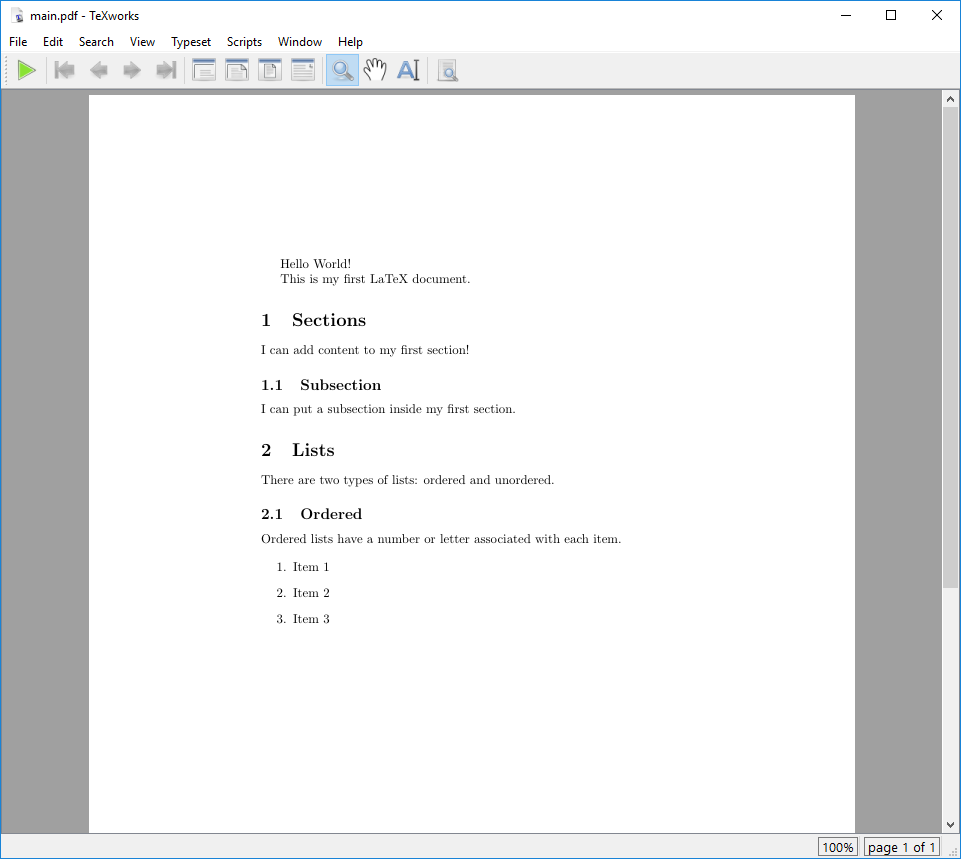
Note that the \item commands do not need to be enclosed
in braces. These commands do not take any arguments, so they can be used
as standalone commands. The text that follows the \item
command will be treated as the content of the list item. However, you
are able to specify your own bullet point symbols with
\item[] manually. For instance, you can use
> if you want a list with this symbol you can use the
following LaTeX code:
LATEX
% This command tells LaTeX what kind of document we are creating (article).
\documentclass{article}


% Everything before the \begin{document} command is called the preamble.
\begin{document} % The document body starts here

% List with custom bullet point symbols
\begin{itemize}
  \item[>] Purple Parrots
  \item[>] Blue Barracudas
  \item[>] Silver Snakes
\end{itemize}

\end{document}The enumitem package enables us to customize
bullet-points globally or for a specific list:
LATEX
\documentclass{article}

\usepackage{enumitem} % package for lists
\setlist[enumerate]{label=\Roman*} % globally defining enumeration

\begin{document}

% ordered list with capitalize roman numbering
\begin{enumerate}
  \item First
  \item Second
  \item Third
  \item Fourth
\end{enumerate}

% ordered list with local changes
\begin{enumerate}[
  label=\emph{\roman*}, % local change of labeling system
  leftmargin=5cm, % change indent on the left
]
  \item First
  \item Seconds
  \item Third
  \item Fourth
\end{enumerate}

% unordered list
\begin{itemize}[label=>]
  \item Item 1
  \item Item 2
  \item Item 3
\end{itemize}

\end{document}
Notice also that an unordered list is just as easy. We can use the
exact same syntax, but replace the enumerate environment
with itemize.
Challenge 1: What needs to change?
Challenge 2: Can you do it?
We would like to have the following appear in our LaTeX document:
- Apples
- Gala
- Fuji
- Granny Smith
- Bananas
- Oranges
How would you write this in LaTeX?
Challenge 3: Can you nest your list counter?
We would like to have the following appear in our LaTeX document:
- Introduction
-
Main
- 2.1 Theory
- 2.2 Real World
- Discussion
Our colleague suggests that we use the enumitem package.
Add \usepackage{enumitem} to our document, then look at the
enumitem
documentation, specifically the “Quick Reference” for an idea how to
use it.
How would you write this in LaTeX?
The enumitem package provides commands to reference
counters at different nesting levels of a list.
enumitem adds options to the
\begin{enumerate} command that com in square brackets
immediately after:
\begin{enumerate}[label={label format}].
We can use \arabic in the label to use arabic numbering,
but we specifically want something like “2.1” - where the first number
refers to the outer list value. We could write
\begin{enumerate}[label=2.\arabic*], but see if you can
find a command to refer to value of the outer list.
To refer to the counter at the first level, use
\theenumi, where the trailing i indicates the
first level. The levels are denoted using Roman numerals, so the second
level uses \theenumii, the third \theenumiii,
and the fourth \theenumiv.
We are using arabic numerals, so we will use the \arabic
command after the counter.
LATEX
\documentclass{article}

\usepackage{enumitem} % package for lists

\begin{document}

\begin{enumerate}
  \item Introduction
  \item Main
    \begin{enumerate}[label=\theenumi.\arabic*]
      \item Theory
      \item Real World
    \end{enumerate}
  \item Discussion
\end{enumerate}

\end{document}
In this case we customized the second level list locally, meaning the
changes only apply to this specific list. \theenumi
retrieves the current parent number, the . adds the dot
between the two numbers and \arabic* adds the sub item
number in arabic format, where * serves as a placeholder
for the current list level’s counter.
- Lists in LaTeX are created using the
enumerateanditemizeenvironments. - Using the
enumitempackage to customize bullet points.