
Citations and References
Last updated on 2026-07-26 | Edit this page
Overview
Questions
- How do I add bibliographic references to my document?
- How do I format my references in LaTeX?
- How do I cite references in my document?
Objectives
- Learn how to use a reference database to manage references in LaTeX documents.
- Explore different ways of citing references in our document.
Citations and References
For bibliographic citations, while you can include references sources
directly in our document, usually you will get that information from one
or more external files. Such a file is a database of references,
containing the information in a processing-friendly format (which is
called BibTeX). Using one or more reference databases lets
you re-use information and avoid manual formatting.
Settings
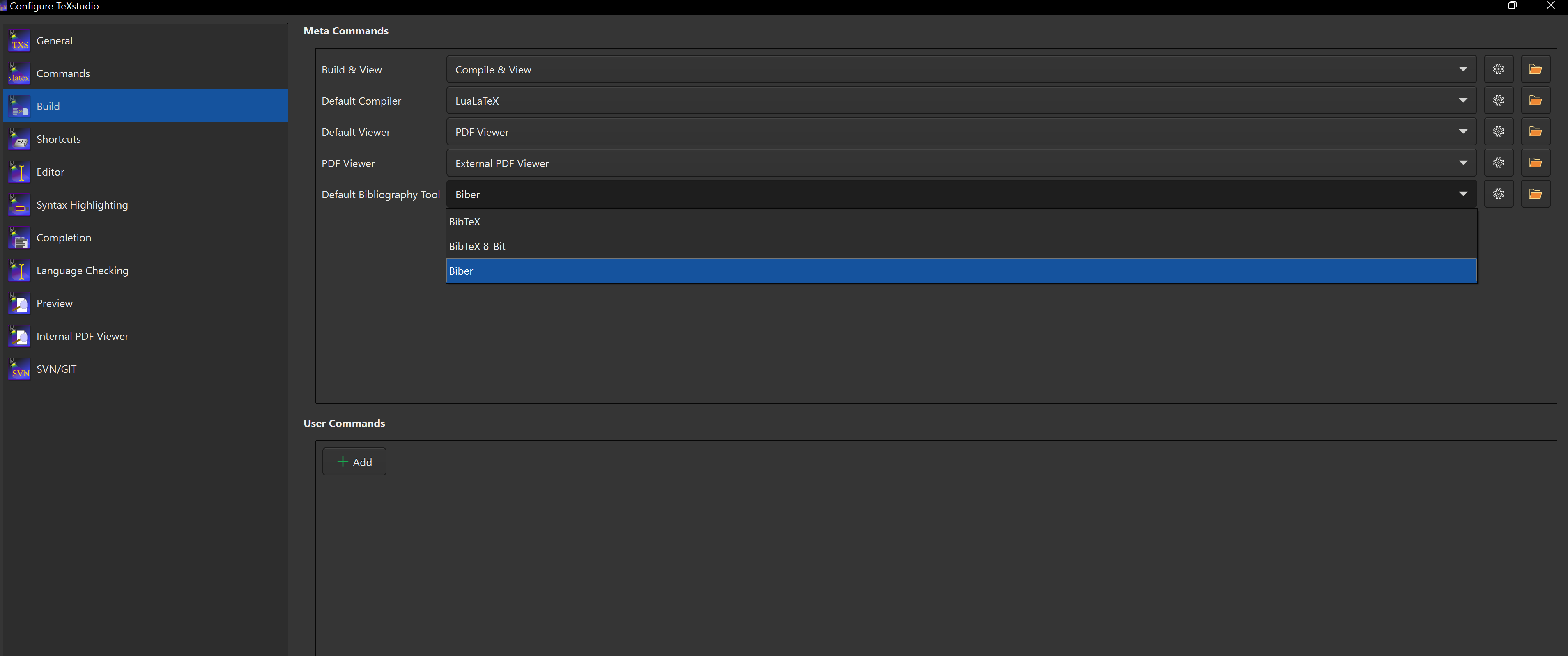
TeXstudio offers several backend options for handling
BibTeX files. For the purposes of this workshop, we’ll use
Biber. Open TeXstudio and go to Options
> Configure TeXstudio. In the configuration dialog,
select Build from the left-hand panel. Under
Default Bibliography Tool, open the drop-down menu and
select Biber.
Reference Databases (BiBTeX)
Reference databases are normally referred to as BiBTeX
files, and have the extension .bib. They contain one or
more entries, one for each reference, and within each are a series of
fields.
Create a new file in your project called
sample-references.bib and add the following content:
BIBTEX
@article{Thomas2008,
	author  = {Thomas, Christine M.},
	title   = {The Fascinating World of Penguins},
	journal = {Penguin Chronicles},
	date    = {2008},
	pages   = {7009-7024},
}

@book{Graham1995,
	author    = {Graham, Richard L. and Harris, Lisa A.},
	title     = {The Humble Paperclip},
	subtitle  = {Master of the Modern Office},
	publisher = {Scranton Press},
	year      = {1995},
}
This is an example of a BiBTeX file that contains a reference for an
article and another for a book. Each entry type begins with the
@ symbol, followed by the entry type
(e.g. article), with all information enclosed in curly
braces {}. The first element (e.g. Thomas2008)
inside the curly braces is the reference key, which is used to cite the
entry in the document.
Beyond the types already mentioned, other commonly supported types
include manual, conference,
proceedings, and techreport. If none of the
available types are suitable, misc can be used as a
fallback, however this may lead to incomplete references and formatting
inconsistencies.
The various fields are given in key-value format. Which fields are
required depends on the entry type and bibliography style. Common fields
are author, title, publisher,
year, edition, journal,
volume, and pages, among many others.
You might notice that in the author field, surname and
given name and each entry (author) is separated by the word
and. This is essential: the format of the output needs to
know which author is which. When using biblatex this
applies also to the fields publisher and
location, in which you can also have many values.
You might also notice that in the article title, some entries are in an extra set of braces. This is to prevent any case-changing that might be applied to the title.
The BibTeX Format
Editing BiBTeX files by hand can be difficult and tedious. A number of tools exist to help you manage your reference files. You can find a list of suggested tools in the references section.
For the purposes of this workshop, we’ll use biblatex,
but feel free to explore other options (e.g. natbib) on
your own.
There are many different bibliography styles available, and you can find a list of them at CTAN. Check if one of those bibliography and citation styles meets your requirements. If you want to finetune an existing one we suggest to take a look at biblatex-ext.
Challenges
Challenge 1: Add another reference, then delete it.
Try adding the following reference to your
sample-references.bib file:
BIBTEX
@book{Huff1954,
  author    = {Huff, Darrell},
  title     = {How to Lie with Statistics},
  publisher = {W. W. Norton \& Company},
  year      = {1954},
}
Then, add a citation to this reference in your document. Try a couple different styles of citation commands. Then, once you have it working, delete the reference and re-compile your document. What happens?
You might expect removing the reference to either error or remove the citation from the text, but it doesn’t - instead we get a placeholder in the text and a warning in the log. A missing reference is not so critical an error that we can’t render the document, but we should probably fix it.
Challenge 2: What’s wrong with this?
We have the following reference in our document:
BIBTEX
@misc{mikolov2013,
	title         ={Efficient Estimation of Word Representations in Vector Space},
	author        ={Mikolov, Tomas and Chen, Kai and Corrado, Greg and Dean, Jeffrey},
	year          ={2013},
	eprint        ={1301.3781},
	archivePrefix ={arXiv},
	primaryClass  ={cs.CL},
	url           ={https://arxiv.org/abs/1301.3781},
}
We are using biblatex to manage our references, and we
identify this reference in the text like this:
When we compile our document, we see the following error:
OUTPUT
The Word2Vec algorithm (mikolov) is a popular
method for generating word embeddings.
What’s wrong with this reference? How can we fix it?
We are referencing the key mikolov in our document, but
the key in our BibTeX file is mikolov2013. We need to
update our citation command to \autocite{mikolov2013}. Note
that LaTeX still compiles the document, but it gives us a warning that
the reference is missing and uses the key as a placeholder. You might
use this to temporarily mark a reference that you haven’t added yet,
just be sure to clear all of your warnings before finalizing your
document.
Challenge 3: What’s the problem with this?
We include the following reference in our document:
BIBTEX
@article{bentham2011,
	author = {H. Muller, Rainer and Shegokar, Ranjita and M. Keck, Cornelia},
	title = {20 Years of Lipid Nanoparticles (SLN & NLC): Present State of Development & Industrial Applications},
	journal= {Current Drug Discovery Technologies},
	year = {2011},
	volume = {8},
	number = {3},
	pages = {207--227},
	doi = {https://doi.org/10.2174/157016311796799062},
	publisher = {Bentham Science Publishers},
}
We are using biblatex and cite this reference in the
text as follows:
What happens when compiling this document? What is wrong with the reference, and how can it be fixed?
The issue in this reference is caused by a special character
(& in the title field). In LaTeX the ampersand
& is reserved for alignment, so it must be escaped
(\&)in normal text.
If special characters are not escaped properly, LaTeX produce
unexpected output or may fail to compile. In some cases, this can also
corrupt auxiliary files (such as .aux or
.bbl), preventing the document from rendering as expected.
If problems persist after correcting the reference, a common solution is
to delete all intermediate files and recompile the document from
scratch. Deleting them forces a clean rebuild.
Corrected bib entry:
BIBTEX
@article{bentham2011,
	author = {H. Muller, Rainer and Shegokar, Ranjita and M. Keck, Cornelia},
	title = {20 Years of Lipid Nanoparticles (SLN \& NLC): Present State of Development \& Industrial Applications},
	journal= {Current Drug Discovery Technologies},
	year = {2011},
	volume = {8},
	number = {3},
	pages = {207--227},
	doi = {https://doi.org/10.2174/157016311796799062},
	publisher = {Bentham Science Publishers},
}
Challenge 4: APA Style and coloring.
Again we have the example:
LATEX
The Word2Vec algorithm by \textcite{mikolov2013} is a popular
method for generating word embeddings.
Change the bibliography style to the American Psychological Association (APA) style by replacing the default style option. What differences do you notice?
As a bonus challenge, try to colorize your citation links in blue.
The hyperref package is used to manage links in LaTeX.
To colorize links, you first need to enable colored links and then set
the desired color using the \hypersetup{} command.
LATEX
\documentclass{article}

\usepackage[style=apa]{biblatex} % APA style
\addbibresource{sample-references.bib}
\usepackage{hyperref}

\hypersetup{
	colorlinks = true, % enable coloring
	citecolor = blue,  % change color
}


\begin{document}

The Word2Vec algorithm by \textcite{mikolov2013} is a popular
method for generating word embeddings.


\printbibliography

\end{document}
The bibliography style also influences which information is printed.
Due to the change to the APA style, the values of the fields
archivePrefix, primaryClass, and
eprint are no longer printed.
- References are stored in a reference database, separate from the LaTeX document.
- BibTeX files are used to store references in a processing-friendly
format and have the extension
.bib. - There are multiple libraries available to manage references in LaTeX
documents, including
biblatex. - We can use the
\citecommand or one of its variants to cite references in our document.