
Extending Classes with Inheritance
Last updated on 2026-06-23 | Edit this page
Overview
Questions
- What if we want classes that are similar, but handle slightly different cases?
- How can we avoid duplicating code in our classes?
Objectives
- Explain the concept of inheritance in object-oriented programming
- Demonstrate how to create a subclass that inherits from a parent class
- Show how to override methods and properties in a subclass
Extending Classes with Inheritance
So far you may be wondering why classes are useful. After all, all we’ve really done in essence is make a tiny module with some functions in it that are slightly more complicated than normal functions. One of the real powers of classes is the ability to limit code duplicate through a concept called inheritance.
Inheritance
Inheritance is a way to create a new class that contains all of the same properties and methods as an existing class, but allows us to add additional new properties and methods, or to override existing methods. This allows us to create a new class that is a specialized version of an existing class, without having to rewrite a whole bunch of code.
Taking a look at our Car class from earlier, we might want to create
a new class for a specific type of bank account, like a Savings account
or a Checking account. Both kinds of accounts will have the same basic
properties and methods, but they will also have some additional
properties and methods that are specific to the type of account, or
properties that are set by default, like our interest_rate
property.
But since both types of accounts are still accounts, they will share a lot of the same properties and methods. Rather than repeating all of the code from the Account class in both our new classes, we can use inheritance to create our new classes based on the Account class:
In python, this would look something like this:
PYTHON
class BankAccount:
    # Static property to keep track of the next available account number
    next_account_number = 10000

    def __init__(self, account_holder, balance = 0.0):
        self.account_holder = account_holder
        BankAccount.next_account_number += 1
        self.account_number = BankAccount.next_account_number
        self._balance = balance

    # ... the rest of the BankAccount class ...

class SavingsAccount(BankAccount):
    def __init__(self, account_holder, balance = 0.0, interest_rate = 0.01):
        super().__init__(account_holder=account_holder, balance=balance)
        self.interest_rate = interest_rate

    def apply_interest(self):
        self._balance += self._balance * self.interest_rate

class CheckingAccount(BankAccount):
    def __init__(self, account_holder, balance = 0.0, overdraft_limit = 500.0):
        super().__init__(account_holder=account_holder, balance=balance)
        self.overdraft_limit = overdraft_limit

    def withdraw(self, amount):
        if self._balance - amount < -self.overdraft_limit:
            raise ValueError("Withdrawal would exceed overdraft limit.")
        self._balance -= amount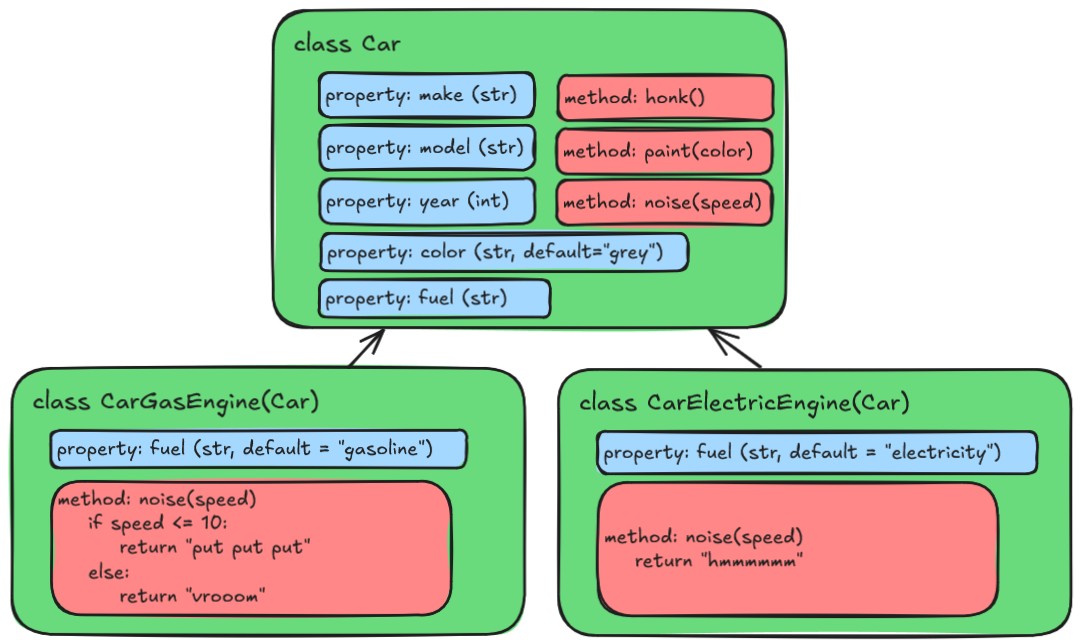
Note that the withdraw method in the
CheckingAccount class is overridden to provide a different
implementation than the one in the BankAccount class. This
is called method overriding, and it allows us to define a different
behavior for a method in a subclass. When we call the
withdraw method on an instance of
CheckingAccount, it will use the overridden method, rather
than the one defined in the BankAccount class.
However in SavingsAccount, we do not override the
withdraw method, so it will use the one defined in the
BankAccount class.
More on overriding methods in a moment.
You can see that the SavingsAccount class is defined in a similar way
to the BankAccount class, but it inherits from the BankAccount class by
including it in parentheses after the class name. The
__init__ method of the CheckingAccount class also has a
call to super().__init__(). The super()
function is a way to refer specifically to the parent class, in this
case, the BankAccount class. This allows us to call the
__init__ method of the BankAccount class, which sets up all
of the properties that a BankAccount has.
Applying Inheritance to Our Car Class
For our Car class, let’s create different sub classes
depending on the kind of engine the car has. We can have a
GasolineCar class and an ElectricCar class
that both inherit from the Car class. Both these classes
will share a lot of the same properties and methods, but might have some
additional properties and methods that are specific to the type of car.
Let’s add the following code to our
src/vehicle_module/car.py file:
PYTHON
class Car:
    car_count = 0

    def __init__(self, make, model, year, color = "grey", fuel = "gasoline"):
        # ... the rest of the Car class ...

class GasolineCar(Car):
    pass # For now, a GasolineCar is just a Car, so we don't need to add any additional properties or methods

class ElectricCar(Car):
    def __init__(self, make, model, year, color = "grey", fuel = "electricity"):
        super().__init__(make=make, model=model, year=year, color=color, fuel=fuel)

    def make_engine_noise(self):
return "hmmmmmm"Couldn’t you do something like this?
PYTHON
class ElectricCar(Car):
    def __init__(self, make, model, year, color = "grey"):
        super().__init__(make=make, model=model, year=year, color=color, fuel="electricity")
Yes, you could - however this would change the signature of the
__init__ method in the ElectricCar class,
which means that you would not be able to create an instance of
ElectricCar using the same parameters as you would for a
GasolineCar. Anyone trying to use the
ElectricCar class would have to know that it specifically
has a slightly different __init__ method than the other
cars.
This is not necessarily a bad thing, but it can lead to confusion if
you have a lot of different subclasses that all have different
__init__ methods. By keeping the same signature for the
__init__ method, we can ensure that all of our car classes
can be instantiated in the same way, which makes it easier to use them
interchangeably.
Overriding Methods
Notice that in the ElectricCar class, we have overridden
the make_engine_noise method to provide a different
implementation. This is an example of how we can override methods and
properties in a subclass to provide specialized behavior. When we create
an instance of ElectricCar, it will use the
make_engine_noise method defined in the
ElectricCar class, rather than the one defined in the
Car class.
When overriding methods, it’s important to ensure that the new method has the same signature as the method being overridden. This means that the new method should have the same name, number of parameters, and return type as the method being overridden.
Testing our Inherited Classes
Now let’s try out our classes in our little test file. Let’s update
our tests/car_class_tests.py file to test our new
GasolineCar and ElectricCar classes:
PYTHON
import sys

sys.path.insert(0, "./src")

from vehicle_module.car import Car, ElectricCar, GasolineCar

total_tests = 6
passed_tests = 0
failed_tests = 0

# ... existing tests for Car class ...

# Test creating a GasolineCar
gas_car = GasolineCar(make="Toyota", model="Camry", year=1996, color="Maroon")
if gas_car.fuel == "gasoline":
    passed_tests += 1
else:
    failed_tests += 1

# Test creating an ElectricCar
electric_car = ElectricCar(make="Skoda", model="Elroq", year=2024, color="White")
if electric_car.fuel == "electricity":
    passed_tests += 1
else:
    failed_tests += 1

# Test the make_engine_noise method of ElectricCar
if electric_car.make_engine_noise() == "hmmmmmm":
    passed_tests += 1
else:
    failed_tests += 1
You should get some output that looks like this:
Total tests: 6
Passed tests: 6
Failed tests: 0
Abstract Base Classes
If we’re thinking about this from the context of a game, there’s
actually maybe a level of less specificity that is below even the
Car class, which is just a general Vehicle
class. Cars are going to have a lot of the things we defined so far, but
some of the elements are maybe more general to all vehicles. We could
create a Vehicle class that has all of the properties and
methods that are common to all vehicles, and then have the
Car class inherit from the Vehicle class. This
way, we can have a more general class that defines the basic properties
and methods.
This is a great use case for something called an “abstract base class”. An abstract base class is a class that is meant to be inherited from, but is not meant to be instantiated on its own. It can define abstract methods, which are methods that are declared but not implemented in the abstract base class. Subclasses that inherit from the abstract base class are then required to implement the abstract methods, or else the construction of the subclass will fail.
Abstract base classes are implemented in Python using the
abc module. Let’s create a new file called
src/vehicle_module/vehicle.py and add the following code to
it:
PYTHON
from abc import ABC, abstractmethod


class Vehicle(ABC):
    car_count = 0

    def __init__(self):
        self.speed = 0
        Vehicle.car_count += 1

    @abstractmethod
    def make_engine_noise(self):
        pass

    @classmethod
    def get_car_count(cls):
        return cls.car_count
You can see that we’ve transferred some of the properties and methods
from the Car class to the Vehicle class, since
they feel like they are more general to all vehicles, rather than just
cars. We have also defined an abstract method called
make_engine_noise with the @abstractmethod
decorator, which means that any class that inherits from
Vehicle will be required to implement the
make_engine_noise method.
Next, let’s update our Car class to inherit from the
Vehicle class:
PYTHON
from datetime import datetime

from .vehicle import Vehicle

class Car(Vehicle):
    # car_count = 0 # We can remove this line since the car_count property is now defined in the Vehicle class

    def __init__(self, make, model, year, color = "grey", fuel = "gasoline"):
        super().__init__() # Add a call to "super().__init__()" to call the __init__ method of the Vehicle class
        self.make = make
        self.model = model
        self.year = year
        self.color = color
        self.fuel = fuel
        # self.speed = 0 # we can remove this line since the speed property is now defined in the Vehicle class

    def honk_horn(self):
        return "Honk! Honk!"

    def paint(self, new_color):
        self.color = new_color

    def make_engine_noise(self):
        if self.speed <= 10:
            return "putt putt"
        else:
            return "vroom!"

    def __str__(self):
        return f"A {self.color} {self.year} {self.make} {self.model} that runs on {self.fuel}."

    @property
    def age(self):
        current_year = datetime.now().year
        return current_year - self.year

    # This entire method is now inherited from the Vehicle class, so we can remove it from the Car class
    # @classmethod
    # def get_car_count(cls):
    #     return cls.car_count
Let’s run our tests again to make sure everything is still working:
$ uv run tests/car_class_test.py
Total tests: 6
Passed tests: 6
Failed tests: 0
Looks good! We’ve got a firm base to build on now!
Quick Side Project - ASCII Art!
Let’s look at an example of how to use an abstract base class to
enforce a common interface. Let’s start with our Vehicle
class. Up until now, our Cars have been sort of theoretical, but let’s
make them real! Let’s create a new directory at
src/vehicle_module/glyphs and create a new file called
car.glyph. Open a text editor and add the following text to
the car.glyph file:
.|-XOX-|..
...OOO....
...XOX....
.|-XOX-|..
This beautiful piece of ASCII art is a very square car viewed from above. The dots represent empty space.
Adding the Glyph to our module
We have a new file in our project, but (and this is a problem for down the line, but we may as well address it here) when we package our module, the packaging process will only include the Python files we’ve written. We need to tell the packaging process specifically that we want to include this new file.
In our pyproject.toml file, add the following lines:
Required Properties
Ok, why did we just add a little text image of a car to our project? We’ll see how this comes into play a little down the line, but for now, let’s say that as a rule, every Vehicle in our project must have a glyph file associated with it. It’s ok if more than one Vehicle uses the same glyph file, but every Vehicle must have a glyph file.
We can enforce this rule by adding a new abstract method to our
Vehicle class, and telling Python that this is also a
property. This is done nearly identically as the abstract methods, but
we also add the @property decorator to the method. Let’s
add the following code to our Vehicle class:
Now, any class that inherits from Vehicle will be
required to implement a glyph_file property. If it doesn’t,
it will be unable to instantiate and the script will fail. Try running
our tests right now. You should see an error that looks like this:
E TypeError: Can't instantiate abstract class Car without an implementation for abstract method 'glyph_file'To fix this, we need to add a property to our Car
class:
Note that it doesn’t matter what the property returns, as long as it
is defined. We could type in our string here, but it would be better to
load in that file that we just added. We need a little bit of extra code
to do that. Since each car only needs to know what the name of the file
is, we can centralize the loading of the file in the
Vehicle class. Let’s add the following code to our
vehicle.py file:
PYTHON
from abc import ABC, abstractmethod
from importlib.resources import files, as_file  # To load in our files from the package

from . import glyph  # The directory we indicated in our pyproject.toml file
Then, we can add a glyph property to load in the
file:
PYTHON
    @property
    def glyph(self):
        resource = files(glyph).joinpath(self.glyph_file)  # Get the path to the file in the package
        with as_file(resource) as path:  # Open the file
            with open(path, "r", encoding="utf-8") as f:  # Read the file
                glyph_string = f.read()  # And return the contents of the file
        return glyph_string
Note that we are calling “self.glyph_file” here, which in the
abstract base class here is just an abstract property. However the way
we’ve set this up, all subclasses of Vehicle will be
required to implement the glyph_file property, so this will
work as expected.
Challenge 1: Predict the output
What will happen when we run the following code? Why?
PYTHON
class Animal:
    def __init__(self, name):
        print(f"Creating an animal named {name}")
        self.name = name

    def whoami(self):
        return f"I am a {type(self)} named {self.name}"

class Dog(Animal):
    def __init__(self, name):
        print(f"Creating a dog named {name}")
        super().__init__(name=name)

class Cat(Animal):
    def __init__(self, name):
        print(f"Creating a cat named {name}")


animals = [Dog(name="Chance"), Cat(name="Sassy"), Dog(name="Shadow")]

for animal in animals:
print(animal.whoami())We get some of the output we expect, but we also get an error:
Creating a dog named Chance
Creating an animal named Chance
Creating a cat named Sassy
Creating a dog named Shadow
Creating an animal named Shadow
I am a <class '__main__.Dog'> named Chance

---------------------------------------------------------------------------
AttributeError                            Traceback (most recent call last)
Cell In[4], line 22
     19 animals = [Dog(name="Chance"), Cat(name="Sassy"), Dog(name="Shadow")]
     21 for animal in animals:
---> 22     print(animal.whoami())

Cell In[4], line 7, in Animal.whoami(self)
      6 def whoami(self) -> str:
----> 7     return f"I am a {type(self)} named {self.name}"

AttributeError: 'Cat' object has no attribute 'name'
We failed to call the super().__init__() method in the
Cat class, so the name property was never set.
When we then try to access the instance property name in
the whoami method, we get an
AttributeError.
Challenge 2: Class Methods and Properties
We’ve mostly focused on instance properties and methods so far, but classes can also have what are called “class properties” and “class methods”. These are properties and methods that are associated with the class itself, rather than with an instance of the class.
Without running it, what do you think the following code will do? Will it run without error?
PYTHON
class Animal:
    PHYLUM = "Chordata"

    def __init__(self, name):
        self.name = name

    def whoami(self):
        return f"I am a {type(self)} named {self.name} in the phylum {self.PHYLUM}"

class Snail(Animal):
    def __init__(self, name):
        super().__init__(name=name)

animal1 = Snail(name="Gary")
Animal.PHYLUM = "Mollusca"
print(animal1.whoami())

animal2 = Snail(name="Slurms MacKenzie")
print(animal2.whoami())

creature3 = Snail(name="Turbo")
creature3.CLASS = "Gastropoda"
print(creature3.whoami(), "and is in class", creature3.CLASS)The PHYLUM property is a class property, so it is shared
among all instances of the class.
There’s two things about this piece of code that are a bit tricky.
1 The PHYLUM property is a class property, so it is
shared among all instances of the class. When we set
Animal.PHYLUM = "Mollusca", we are actually modifying the
class property for all instances going forward, which is why when we
print animal2.whoami(), it shows that the phylum is still
“Mollusca”, even though we created a new instance of
Snail.
2 - We never defined a CLASS property in the
Animal or Snail class, but we can actually
still create a new property on an instance of a class at any time.
(Generally, this is not a good idea, as it can cause confusion when you
reference a property that doesn’t exist in any class definition, but it
is technically possible.)
Challenge 3: Create a new subclass
The previous challenge is not quite correct, as canonnically “Slurms
MacKenzie” is not a snail, but a slug. Create a subclass of ‘Animal’
called “Mollusk” that inherits from “Animal”, but only sets the class
property PHYLUM to “Mollusca”. Then create two subclasses
of “Mollusk”: “Snail” and “Slug”.
You can implement any methods or properties you want in the “Snail” and “Slug” classes, but you may also just leave them empty like so:
It is not necessary for the Snail and Slug
classes to have their own __init__ methods, as they will
inherit the __init__ method from the Animal
class through the Mollusk class.
- Inheritance allows us to create a new class that is a specialized version of an existing class
- We can override methods and properties in a subclass to provide specialized behavior