
Class Objects
Last updated on 2026-06-23 | Edit this page
Estimated time: 12 minutes
Overview
Questions
- What is a class object?
- How can I define a class object in Python?
- How can I use a class object in my module?
Objectives
- Create a Class object in our module.
- Demonstrate how to use our Class object in a sample script.
What is a Class Object?
You can think of a class object as a kind of “blueprint” for an object. It defines what properties the object can have, and what methods it can perform. Once a class is defined, you can create any number of objects based on that class, each of which is referred to as an “instance” of that class.
As an example, let’s imagine a Bank Account. A Bank Account has many properties and can do many things, but for our purposes, let’s limit them slightly. Our Bank Account will have an account holder and balance, and it will be able to deposit, withdraw, and check the balance.
The account holder and balance are all “properties” of the bank account. Depositing, withdrawing, and checking the balance are all “methods” of the bank account. Here’s a diagram of our bank account object:
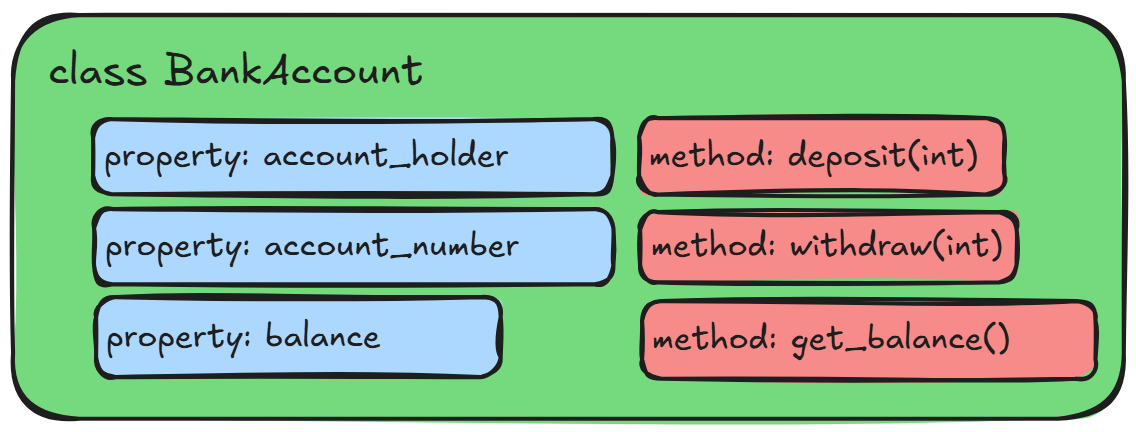
In python we can define a class object like this:
PYTHON
class BankAccount:
    def __init__(self, account_holder, account_number, balance = 0.0):
        self.account_holder = account_holder
        self.account_number = account_number
        self.balance = balance

    def deposit(self, amount):
        if amount > 0:
            self.balance += amount
        else:
            raise ValueError("Deposit amount must be positive")

    def withdraw(self, amount):
        if amount > 0:
            if self.balance >= amount:
                self.balance -= amount
            else:
                raise ValueError("Insufficient funds")
        else:
            raise ValueError("Withdrawal amount must be positive")

    def get_balance(self):
return self.balanceThe convention in python is that all classes should be named in CamelCase, with no underscores. There are no limits enforced by the interpreter but it is good practice to follow the standards of the python community.
The get_balance method is an example of a “getter”
method, which simply exposes a property of the class. In this case, it
allows us to access the balance property of the class
without directly accessing the variable itself. This is a common pattern
in object-oriented programming, and it can be useful for a number of
reasons, such as allowing us to add additional logic when accessing the
property (e.g. checking if the balance is negative before returning it),
or allowing us to change the internal representation of the property
without affecting the external interface of the class.
Python has a special decorator called @property that
allows us to define getter methods in a more elegant way - we’ll get to
decorators in a later episode.
Some of this might look familiar if you think about how we define
functions in Python. There’s a def keyword, followed by the
function name and parentheses. Inside the parentheses, we can define
parameters, and these parameters can contain default values. We can also
include type hints, for both parameters and return values. However all
of this is indented one level, underneath the class
keyword, which is followed by our class name.
Note that this is just our blueprint - it doesn’t refer to any
specific bank account, just the general idea of a bank account. Also
note the __init__ method. This is a special method which is
called whenever you “instantiate” a new object. The parameters for this
function are supplied when we first create an object and function
similarly to a method, in that if no default value is provided, it is
required in order to create the object, and if a default value is
provided, it is optional.
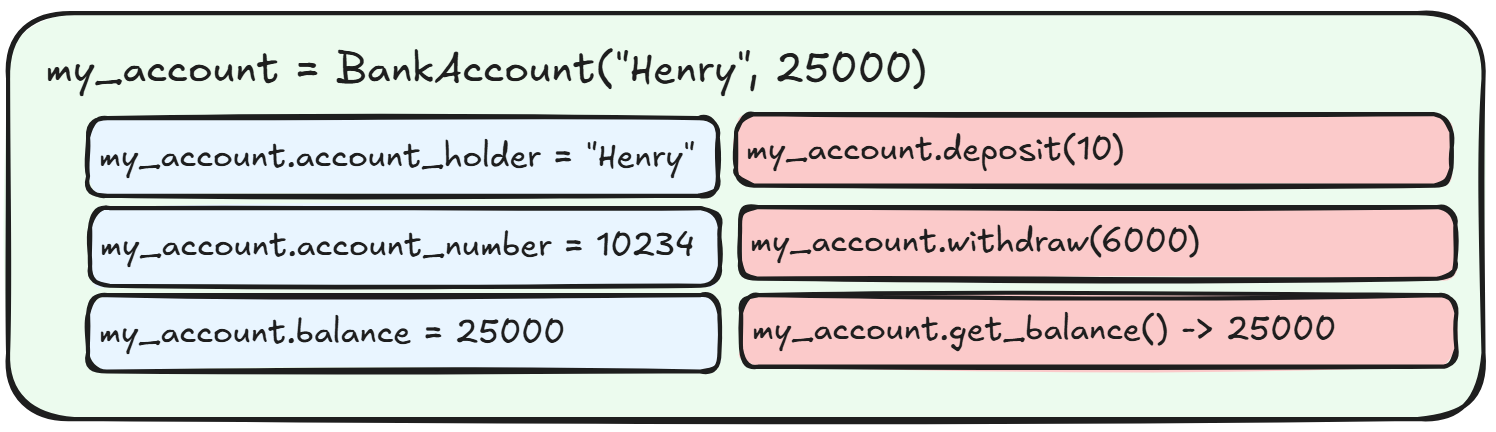
An instance of a bank account, in this case called “my_account” might look something like this:
What exactly is “an instance”?
An instance is how we refer to a specific object that has been created from a class. The class is the “blueprint”, while the instance is the actual object that is created based on that blueprint.
In our example, my_account is an instance of the
BankAccount class. It has its own specific values for the
properties defined in the class (balance, account_holder), and it can
use the methods defined in the class (deposit, withdraw,
get_balance).
Also note that each of the methods within the class object definition
starts with a “self” argument. This is a reference to the current
instance of the class, and is used to access variables that belong to
the class. In our example, we store the balance and account_holder as
properties of the class. When we call the get_balance
method, we use self.balance to refer to the current
instance’s balance property.
We can create a new instance of our BankAccount class
like this:
This sets the account_holder property to “Jimmy”, the
account_number property to 12345, and the
balance property to 100.0, but only for this specific
instance of the BankAccount class. If we create
another instance, it will have its own account_holder,
account_number, and balance properties, which
can be different from the first instance. We can check the properties of
our instance like this:
PYTHON
print(my_account.account_holder)  # Output: Jimmy
print(my_account.account_number)  # Output: 12345
print(my_account.balance)         # Output: 100.0
We can create another instance of the BankAccount
class:
PYTHON
another_account = BankAccount(account_holder="Mike", account_number=67890, balance=2000.0)
print(another_account.account_holder)  # Output: Mike
print(another_account.account_number)  # Output: 67890
print(another_account.balance)         # Output: 2000.0
Modifying the properties of one instance does not affect the properties of another instance:
A Class object for Our project
Let’s create a class object for our vehicle module. Since we’re going
to create some useful objects and methods for working with vehicles,
let’s define a Car class.
What properties and methods might we want to include in our Car class?
- Make / Model / Year
- Color
- Fuel
- Honk its horn
- Paint it a color
- Make engine noises
Lets start writing our class object in a new file:
src/vehicle_module/car.py:
PYTHON
class Car:
    def __init__(self, make, model, year, color = "grey", fuel = "gasoline"):
        self.make = make
        self.model = model
        self.year = year
        self.color = color
        self.fuel = fuel
        self.speed = 0

    def honk_horn(self):
        return "Honk! Honk!"

    def paint(self, new_color):
        self.color = new_color

    def make_engine_noise(self):
        if self.speed <= 10:
            return "putt putt"
        else:
            return "vroom!"
Our class object Car is a “blueprint” for a collection
of methods. When we define it, we need to provide the required
parameters for the __init__ method, which are
make, model, and year. We can
optionally provide color and fuel, which will
default to “grey” and “gasoline” if we don’t provide them.
The __init__ method is called as soon as the object is
created, and we can see that in addition to storing the parameters to
their self counterparts, there is an additional property
called self.speed. This property is used to store the
current speed of the car. It is referenced in the
make_engine_noise method, which returns a different string
depending on the value of self.speed.
Principle of Least Astonishment (or, We’re All Adults Here)
Unlike other programming languages, python doesn’t have the concept
of “private” or “internal” variables and methods. Instead there is a
convention which says that any variable or method that is intended for
internal use should be prefixed with an underscore
(e.g. content). This is however just a convention - there
is nothing stopping you from accessing these variables and methods from
outside the class if you really want to.
There are also three methods that we’ve defined -
honk_horn, paint, and
make_engine_noise. None of these will be called directly on
the class itself, but rather on instances of the class that we create
(as indicated by the use of self within the class methods).
Note that the paint and make_engine_noise
methods reference the self.color and
self.speed properties. The self keyword refers
to the specific instance of the class itself, and so it has
access to all of its properties and methods, including the
self.color and self.speed properties.
Trying out Our Class Object
Let’s try out our new class object.
Next, let's create another test file. Our last one was called `vehicle_module_test.py`, so let's call this
`car_class_test.py`:

```python
import sys

sys.path.insert(0, "./src")

from vehicle_module.car import Car

total_tests = 3
passed_tests = 0
failed_tests = 0

# Check that we can create a Car object
car = Car(make="Toyota", model="Corolla", year=2020)
if car.make == "Toyota" and car.model == "Corolla" and car.year == 2020:
    passed_tests += 1
else:
    failed_tests += 1

# Test the methods
if car.honk_horn() == "Honk! Honk!":
    passed_tests += 1
else:
    failed_tests += 1

if car.make_engine_noise() == "putt putt":
    passed_tests += 1
else:
    failed_tests += 1

print(f"Total tests: {total_tests}")
print(f"Passed tests: {passed_tests}")
print(f"Failed tests: {failed_tests}")
Now we’ll run this file using our uv environment:
You should see the output:
Total tests: 3
Passed tests: 3
Failed tests: 0Challenge: What does this code do?
Take a look at the following code. Without running it yourself, what is the output of the final line?
PYTHON
class Cat:
    def __init__(self, name, age):
        self.name = name
        self.age = age
        self.is_sleeping = False

    def meow(self):
        if self.is_sleeping:
            return "Zzz..."
        else:
            return "Meow!"

    def sleep(self):
        self.is_sleeping = True

    def hear(self, sound):
        if sound == "food tin":
            self.is_sleeping = False
        else:
            self.is_sleeping = self.is_sleeping

my_cat = Cat(name="Squire Julian Gingivere", age=14)
my_cat.sleep()
my_cat.hear("psst psst psst!")
my_cat.sleep()
print(my_cat.meow())
my_cat.hear("food tin")
my_cat.hear("dinner time!")
print(my_cat.meow())The output of the final line will be “Meow!”. In order to know the
output, we need to follow the state of the instance variable
is_sleeping throughout the code:
PYTHON
my_cat = Cat(name="Squire Julian Gingivere", age=14)  # is_sleeping = False
my_cat.sleep()                                        # is_sleeping = True
my_cat.hear("psst psst psst!")                        # is_sleeping = True (no change)
my_cat.sleep()                                        # is_sleeping = True (no change)
print(my_cat.meow())                                  # Output: "Zzz..." (because is_sleeping == True - no effect on is_sleeping)
my_cat.hear("food tin")                               # is_sleeping = False (because sound == "food tin")
my_cat.hear("dinner time!")                           # is_sleeping = False (no change)
print(my_cat.meow()) # Output: "Meow!" (because is_sleeping == False)Challenge: Make a Class
Try your hand at creating your own class called “Dog”. Try to write it such that the following code will run with the following output:
PYTHON
my_dog = Dog(name="Wally", breed="Mixed", age=12)
print(my_dog.name)
print(my_dog.make_sound())
print(my_dog.fetch())
Output:
Wally
Aroooo!
Yeah you can get the ball yourself.Challenge: Update the Dog Class
Edit the Dog class so that the fetch method
accepts a parameter called item and returns a string that
says “Yeah you can get the {item} yourself.” where {item}
is replaced with the value of the item parameter.
Example usage:
PYTHON
my_dog = Dog(name="Wally", breed="Mixed", age=12)
print(my_dog.fetch("ball"))
print(my_dog.fetch("toy"))
Output:
Yeah you can get the ball yourself.
Yeah you can get the toy yourself.
Bonus: Add a parameter to the init method called
favorite_toy that defaults to “tennis ball”. Then, update
the fetch method so that if the item parameter
matches the favorite_toy property, it returns “That’s my
favorite toy! I’ll get it for you!” instead.
PYTHON
class Dog:
    def __init__(self, name, breed, age):
        self.name = name
        self.breed = breed
        self.age = age

    def make_sound(self):
        return "Aroooo!"

    def fetch(self, item):
        return f"Yeah you can get the {item} yourself."
And for the bonus:
PYTHON
class Dog:
    def __init__(self, name, breed = "Mixed", age = 0, favorite_toy = "tennis ball"):
        self.name = name
        self.breed = breed
        self.age = age
        self.favorite_toy = favorite_toy

    def make_sound(self):
        return "Aroooo!"

    def fetch(self, item):
        if item == self.favorite_toy:
            return "That's my favorite toy! I'll get it for you!"
        else:
return f"Yeah you can get the {item} yourself."Challenge: Update the Dog Class Again
Update the constructor of the Dog class so that it has
default values for the breed and age
parameters. The default value for breed should be “Mixed”,
and the default value for age should be 0.
Running the following code should work without error and produce the following output:
PYTHON
my_dog = Dog(name="Molly", breed="Black Labrador")
print(my_dog.name)
print(my_dog.breed)
print(my_dog.age)

my_other_dog = Dog(name="Buddy", age=5)
print(my_other_dog.name)
print(my_other_dog.breed)
print(my_other_dog.age)

my_neighbors_dog = Dog(name="Garth")
print(my_neighbors_dog.name)
print(my_neighbors_dog.breed)
print(my_neighbors_dog.age)
Output:
Molly
Black Labrador
0
Buddy
Mixed
5
Garth
Mixed
0PYTHON
class Dog:
    def __init__(self, name, breed = "Mixed", age = 0):
        self.name = name
        self.breed = breed
        self.age = age

    def make_sound(self):
        return "Aroooo!"

    def fetch(self, item):
        return f"Yeah you can get the {item} yourself."
As with writing python functions, we can provide default values for
parameters for our class in the __init__ method. This
allows us to create instances of the class without having to provide
values for every parameter every time, which can be useful in many
situations.
Challenge: Validate the Dog Class
Add a check to ensure that:
- The
nameparameter is a string and is not an empty string. - The
breedparameter is a string and is not an empty string. - The
ageparameter is an integer and is greater than or equal to 0.
If any of these checks fail, raise a ValueError with an
appropriate error message.
You can include these checks either in the __init__
method or in a separate validation method that is called from the
__init__ method.
You can use isinstance() to check the type of a
variable.
You can use raise ValueError("Your error message here")
to raise a ValueError with a custom error message.
PYTHON
class Dog:
    def __init__(self, name, breed = "Mixed", age = 0):
        if not isinstance(name, str) or not name:
            raise ValueError("Name must be a non-empty string")
        if not isinstance(breed, str) or not breed:
            raise ValueError("Breed must be a non-empty string")
        if not isinstance(age, int) or age < 0:
            raise ValueError("Age must be an integer greater than or equal to 0")

        self.name = name
        self.breed = breed
        self.age = age

    def make_sound(self):
        return "Aroooo!"

    def fetch(self, item):
return f"Yeah you can get the {item} yourself."- Python classes are defined using the
classkeyword, followed by the class name and a colon. - The
__init__method is a special method that is called when an instance of the class is created. - Class methods are defined like normal functions, but they must
include
selfas the first parameter.